Article
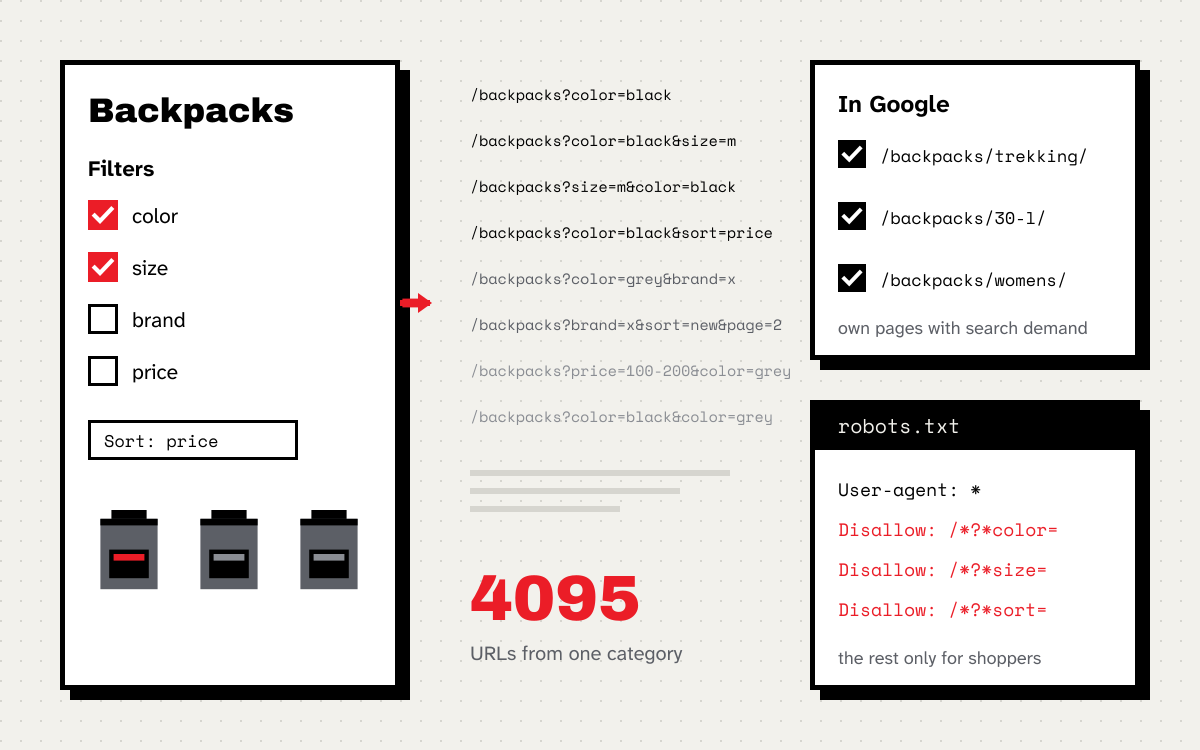
Filters are the most convenient thing in a store for customers and one of the most expensive for SEO. Every click on a color, size, brand or sort order creates a new URL. To a person it is the same category, just narrowed down. To Google it is a separate page that has to be fetched, assessed and either shown or not.
Let’s count one category. Backpacks have a color filter with 8 values, a size filter with 12, a brand filter with 6 and 4 sort orders. If each filter allows one value or none, that gives 9 × 13 × 7 × 5, or 4,095 URLs. With 200 categories that is over 800,000 URLs, for a store with maybe 5,000 products. When filters allow several values at once, the number keeps growing.
Google describes the problem in its documentation on faceted navigation. A crawler may fetch a very large number of these URLs before it decides they are useless. And the time spent on them is time missing for new products and categories.
First decide which filters have customers in Google
Not every filter is a problem. Some combinations are exactly what people search for: “trekking backpack 30 l”, “women’s hiking boots”, “men’s down jacket”. Combinations like these should have their own proper pages in search. The rest, that is sort orders, products per page, price ranges or three colors at once, has no business being in Google.
I build the list of filters to index from three sources:
- Search Console queries that contain a product attribute,
- keyword research for the category,
- the store’s internal search, because customers type exactly what they are looking for there.
A good filter page has search demand and enough products not to look empty. Anything that does not meet both conditions I treat as a filter for shoppers only.
Filters you do not want in Google
Google lists three methods and says clearly which ones work best.
robots.txt. If you do not need the filtered URLs in search, Google writes that there is no good reason to allow them to be crawled. You block the filter parameters, while products and the unfiltered category stay accessible:
User-agent: *
Disallow: /*?*color=
Disallow: /*?*size=
Disallow: /*?*sort=
Parameter names depend on the platform, so check them in your store’s URLs before you deploy anything.
URL fragments. Google generally ignores filters written after the # sign, so they do not create new URLs to crawl. It is a good fit for stores where filters run in JavaScript.
rel=“canonical” and rel=“nofollow”. Google rates these as weaker and writes that in the long run they are generally less effective than the two methods above. A canonical tag may gradually reduce crawling of filtered versions, and nofollow only works if it is on every link to the URL.
Two traps I see most often:
- robots.txt does not remove URLs from the index. Google says outright that it may index a blocked URL without its content if links point to it. The block controls crawling, not what shows up in results.
- noindex and a robots.txt block at the same time. For
noindexto work, the page must not be blocked by robots.txt. A crawler that cannot fetch the page will never see the tag. If you first need to clean filter URLs out of the index, give themnoindexfirst, wait until they drop out, and only then block them in robots.txt.
Filters that should be in Google
For combinations with demand, Google gives a few specific rules:
- separate parameters with
&, because commas, semicolons and brackets are often not recognized as separators, - when filters are in the URL path, keep a consistent order and do not allow the same filter twice,
- for combinations with no products, for nonsensical combinations and for pagination pages that do not exist, return a 404 instead of redirecting to a generic error page.
I add four more things, without which a filter page has no chance against competitors:
- a readable URL, for example
/backpacks/trekking/30-l/instead of?cat=12&cap=30, - its own title, H1 and short description that say what the customer types,
- a link from the menu or the parent category, so Google finds the page without clicking through filters,
- a place in the sitemap next to regular categories.
Magento, PWA and headless
In Magento 2, layered navigation appends filters to the URL as parameters by default, often with a numeric value ID, for example ?color=49. A URL like that is no good as a landing page, so combinations with demand are better handled with an SEO-friendly URL extension or as separate categories.
In PWA and headless stores the problem is often the reverse. Filters run in JavaScript and Google may not see the combinations it should see at all. Google can only follow links that are <a> elements with an href attribute. A button with a click handler or a link without href is a dead end for the crawler. Filter pages that should be in Google need regular links and content in the HTML.
How to check what it costs your store
-
Search Console, Pages report. Check how many parameter URLs sit in “Crawled, currently not indexed” and “Duplicate without user-selected canonical”. Hundreds of thousands of them against a few thousand products is a sign that filters eat up crawling.
-
Search Console, Crawl stats. Settings → Crawl stats shows how many requests Googlebot sends per day and with what result.
-
Server logs. Count what share of Googlebot visits hit parameter URLs:
grep "Googlebot" access.log | awk '{print $7}' \
  | awk '{ if ($0 ~ /\?/) p++; else s++ } END { print "with parameters:", p, "without:", s }'
A bot’s name is easy to fake, so for important decisions verify the IP addresses against Google’s list.
-
New products. See how many days it takes for a new product to appear in the index. If it takes weeks while the crawler spends that time on filters, you have your answer.
Where to start
- List every parameter that creates filters and sort orders in your store.
- Check in Search Console and your logs how many parameter URLs Google knows and how often it visits them.
- Pick a dozen or so combinations with real demand and turn them into proper pages.
- Block the rest in robots.txt, keeping the order in mind if the index needs cleaning first.
- After a month, compare the crawl stats and how long it takes new products to show up in Google.
If your store has thousands of filter URLs in Search Console and you do not know where to start, get in touch. Sorting out filters is one of the first things I do in a technical audit.