Article
ChatGPT answers questions in two ways: from what the model learned earlier and from live search. In search, ChatGPT gives sources with links, so that is where you can win traffic. OpenAI describes its bots in its crawler documentation, and this article is based on it.
OpenAI’s four bots
| Bot | What it does | Does it follow robots.txt |
|---|---|---|
OAI-SearchBot |
Shows sites in ChatGPT search results | Yes. A site blocked for it will not appear in search answers |
GPTBot |
Collects content that may be used to train models | Yes. Blocking it means the content should not be used for training |
ChatGPT-User |
Visits a page when a user asks a question or uses a GPT action | Possibly not, because a person starts the visit |
OAI-AdsBot |
Checks landing pages of ads in ChatGPT | The documentation does not say. It only visits pages submitted as ads |
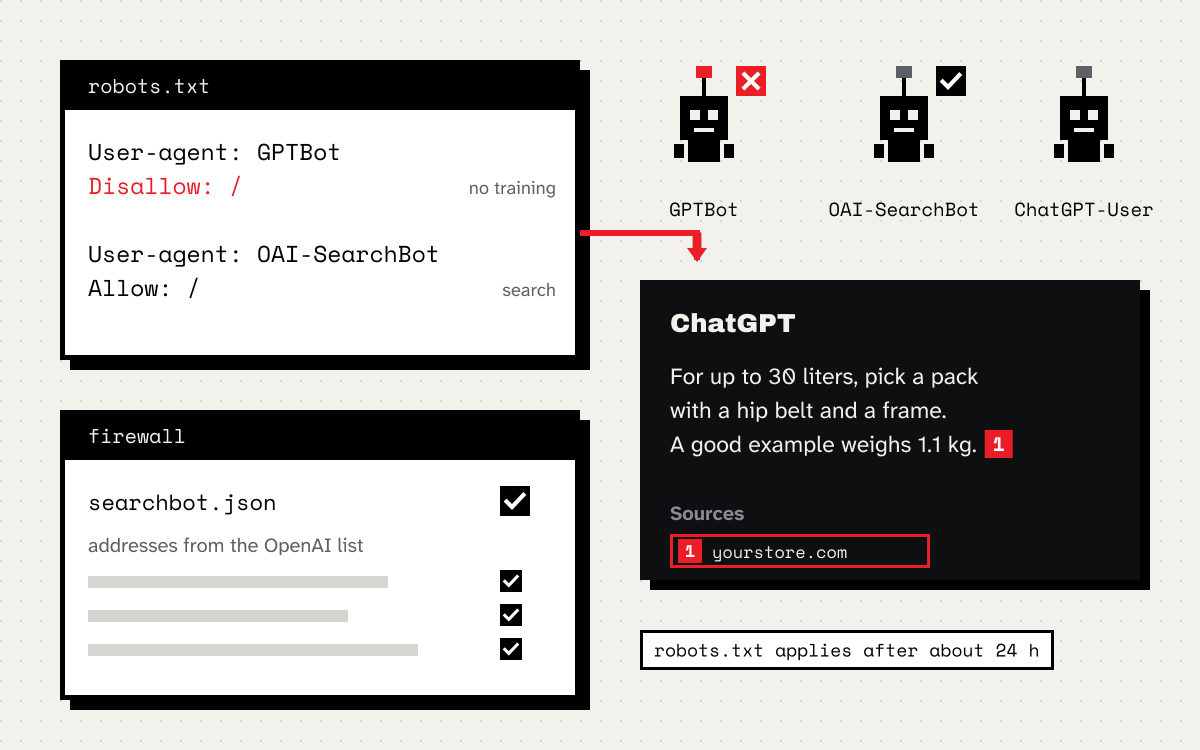
The most important line in the documentation: whether you appear in ChatGPT search is decided by OAI-SearchBot, not by ChatGPT-User. OpenAI also writes that search changes to robots.txt take effect after about 24 hours.
robots.txt that keeps you in search
If you want to appear in ChatGPT answers but do not want to hand over your content for training:
User-agent: GPTBot
Disallow: /

User-agent: OAI-SearchBot
Allow: /
I leave ChatGPT-User without rules, because it is a visit at a person’s request. If you block it, someone who pasted a link to your site into the chat gets an answer without its content.
OpenAI also recommends not blocking the IP addresses in openai.com/searchbot.json. If you run a firewall with an allow list or aggressive bot protection, add those ranges. A bot’s name is easy to fake in the logs, so when blocking or unblocking, check the IP, not just the name.
Where ChatGPT gets its results
Apart from its own crawler, OpenAI’s documentation does not say whose indexes ChatGPT search uses. Tests from 2024, described among others by Windows Latest, showed results very similar to Bing’s. That is not an official confirmation. That is why I treat Bing Webmaster Tools as a cheap step worth taking: add the site, submit a sitemap and check that Bing indexes your important pages. It takes a quarter of an hour and helps beyond ChatGPT too.
Content ChatGPT picks as a source
In search mode, ChatGPT reads several pages and cites the ones that best answer the question. The rules are the same as with other assistants:
- The answer in the first paragraph, the details below.
- Concrete data: prices, dimensions, deadlines, model names, dates.
- One topic per page. A page that answers everything at once loses to one that answers exactly one question.
- Content in the HTML. If a product description only loads through JavaScript, check whether it is in the page source. The easiest way is
curlor your browser’s view source.
In stores I most often see two problems. The first is category descriptions that do not exist or are copied from the manufacturer. The second is comparisons and guides hidden in PDFs or in tabs that do not have their own URL.
How to check the results
- A list of questions. Write down the questions customers ask before buying and check every month who ChatGPT cites. Keep the results in a spreadsheet, because the answers change.
- Logs.
OAI-SearchBotvisits show which pages go into the index.ChatGPT-Uservisits are the moments when someone asks about your topic and ChatGPT comes to your site for the answer. - Analytics. Visits from
chatgpt.comare people who clicked a source. Some browsers do not pass the referrer, so this number will be on the low side.
Where to start
- Check robots.txt for
OAI-SearchBotandGPTBot. - Check that your firewall does not block the addresses in
searchbot.json. - Add your site to Bing Webmaster Tools and submit a sitemap.
- Rewrite the first paragraphs of your most important pages so they answer specific questions.
This article is part of a series on visibility in AI assistants. Start with the article on Claude, where I write more about the content itself and how to check it.