Article
Google has two places where AI answers questions about your industry. The first is Search: AI Overviews above the results and AI Mode. The second is the Gemini app. Different rules apply to each, and one robots.txt token causes most of the confusion.
AI Overviews and AI Mode: regular SEO
Google is direct about this in its guide for site owners. To appear in AI Overviews or AI Mode, a page has to be indexed and eligible to show in Search with a snippet. There are no extra requirements and no special optimization. Google adds that you do not need to create new machine-readable files, AI text files or extra markup for these features.
In practice, this is good news for stores that have their technical SEO in order. The things that earn rankings also earn a chance at AI Overviews:
- Googlebot has access to the page in robots.txt.
- The page is in the index, which you can check in Search Console.
- Important pages have internal links.
- Structured data matches what is visible on the page.
- Your Merchant Center and Business Profile data is up to date.
Traffic from AI Overviews and AI Mode counts toward the Performance report in Search Console, under the Web search type. There is no separate report, so you cannot split it from the rest.
How to limit what Google shows
If you do not want parts of a page to end up in AI Overviews, Google points to the same tools that work for regular snippets:
nosnippetturns off snippets for the whole page,data-nosnippetturns off the snippet for a chosen element,max-snippetlimits snippet length,noindexremoves the page from Search altogether.
Each of them also limits the regular search result, so use them carefully. The main access control is still robots.txt for Googlebot.
Google-Extended: what it does and what it does not
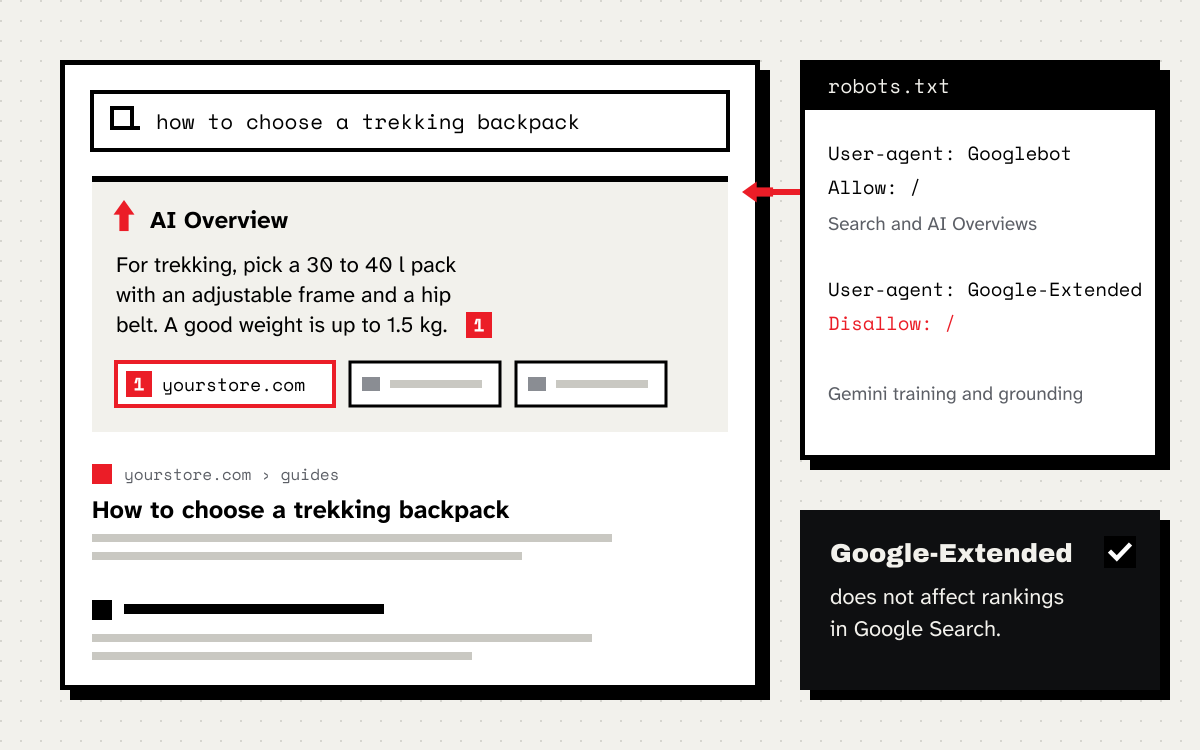
Google-Extended is not a separate bot. It is a token you put in robots.txt, while pages are still fetched by Google’s regular crawler. The token decides whether Google may use your content for two things:
- training future Gemini models that power the Gemini apps and Vertex AI,
- grounding, that is supplying content from the Search index to the model while it answers, in the Gemini apps and in Vertex AI.
Google states plainly that Google-Extended does not affect a site’s inclusion in Search and is not a ranking signal. The documentation does not say whether it affects AI Overviews. From the AI features guide it follows that AI Overviews are controlled through Googlebot and snippet settings, not through Google-Extended.
An example: you want to be in Search and in AI Overviews, but you do not want your content to train Gemini or feed its answers:
User-agent: Google-Extended
Disallow: /
Keep the side effect in mind. The block also switches off grounding in the Gemini app, so Gemini will base its answers on your site less often. For a store that wants to be recommended, that is usually the wrong choice.
Google also announces support for a new AIPREF preference signal for training, with the __usage_ai-training token, in early 2027. It is worth watching the documentation, because this may change the recommendations.
The Gemini app
Gemini shows sources in or below its answer, but not with every answer. When it quotes a longer passage from a page, that page goes on the list of sources. Google does not publish separate optimization rules for the Gemini app, so I stick to what is known: Gemini uses the Search index, and access to content for grounding is controlled by Google-Extended.
Where to start
- In Search Console, check that your most important pages are indexed.
- In robots.txt, check the rules for Googlebot and make a deliberate decision about Google-Extended.
- Look for
nosnippetandmax-snippeton your site. Sometimes they are left over from old releases and quietly limit visibility. - Compare your structured data with the content visible on the page.
This article closes the series on visibility in AI assistants. Start with the article on Claude if you want to learn more about the content itself.