Article
Everyone working on AI visibility writes about llms.txt these days. Some articles present it as a mandatory file without which ChatGPT will not find your site. That is not true. Others call it a useless fad. That is not quite true either.
I have had llms.txt on this site since day one, so I write from practice. Below I explain what the file is, what it looks like, who actually reads it and whether it makes sense for an online store.
What llms.txt is
llms.txt is a Markdown text file that describes a site in a way that is convenient for language models: a name, a short summary and lists of links to the most important pages. Jeremy Howard proposed it on 3 September 2024 at llmstxt.org. The second version of the proposal came out in August 2026.
The idea is simple. A store page is a menu, scripts, banners, cookie pop-ups and a footer. A language model that needs to understand quickly what a company does has to get through all of that. llms.txt gives it a shortcut: this is who we are, and these are the pages worth reading.
It is not a standard of any organisation or search engine. It is a proposal that some sites have adopted and others have not.
What the file looks like
The specification sets the order of elements:
- An H1 heading with the name of the site or project. This is the only required element.
- A blockquote with a short summary.
- Any paragraphs with additional information, without headings.
- H2 sections with lists of links. Each link can have a short note after a colon.
- An “Optional” section for secondary links a model can skip when it is short on space.
The file usually sits in the root directory, at yourstore.com/llms.txt. The second version of the proposal also allows it in a subdirectory, such as /help/llms.txt, where it covers only the pages under that path.
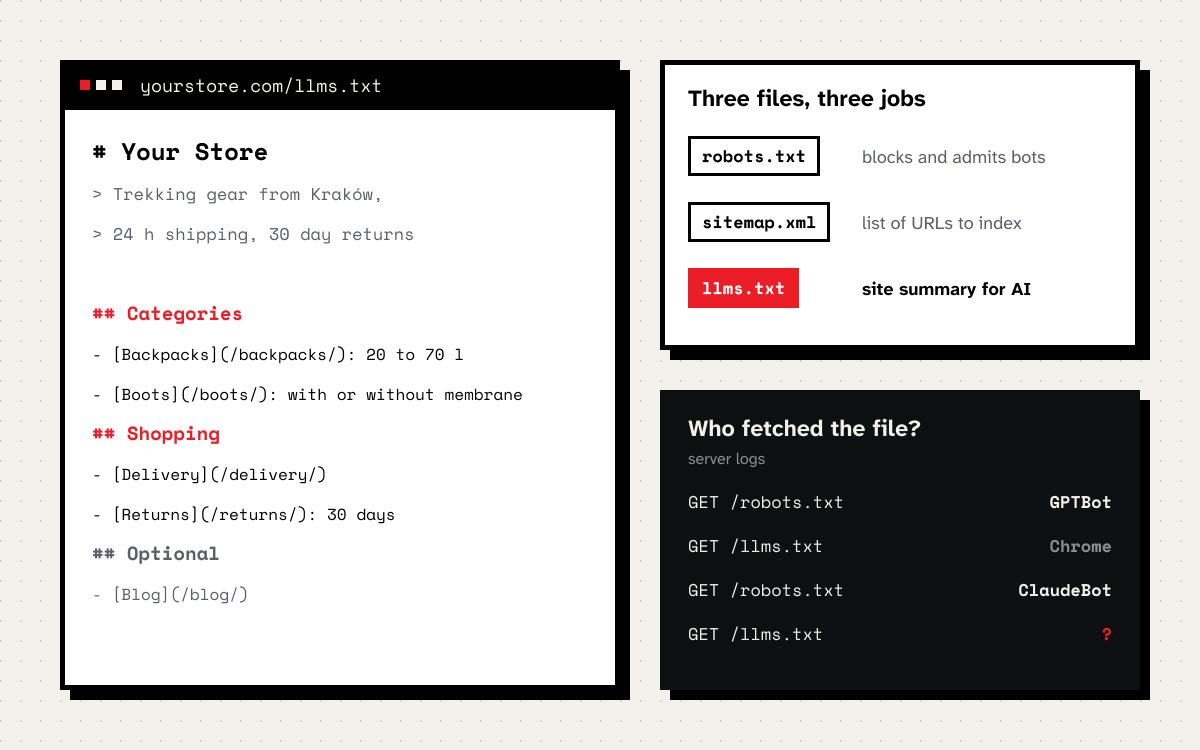
This is what a file for an outdoor gear store could look like:
# Your Store

> Trekking gear store from Kraków. Backpacks, boots and tents
> from European brands, 24 hour shipping, free returns within 30 days.

Prices include VAT. Customer service in Polish and English,
Monday to Friday from 8 to 18.

## Categories

- [Trekking backpacks](https://yourstore.com/trekking-backpacks/): 20 to 70 litres
- [Trekking boots](https://yourstore.com/trekking-boots/): men's and women's, with or without membrane
- [Tents](https://yourstore.com/tents/): from one person to family size

## Guides

- [How to choose a trekking backpack](https://yourstore.com/guide/backpack/): capacity, frame, fit
- [Boot sizes](https://yourstore.com/guide/sizes/): size chart and how to measure your foot

## Shopping

- [Delivery](https://yourstore.com/delivery/): carriers, times and costs
- [Returns and complaints](https://yourstore.com/returns/): 30 days to return, online form
- [Contact](https://yourstore.com/contact/): phone, email, address of the physical shop

## Optional

- [About us](https://yourstore.com/about/): the store's story
- [Blog](https://yourstore.com/blog/): trip reports and gear tests
Notice what is not there. No list of all products, no prices, no stock levels. The file should describe the store, not replace the catalogue. Prices and availability change every day, and in llms.txt they would go stale fast.
Does Google use llms.txt
No. Google states plainly in its documentation on AI features in Search that you do not need to create new machine readable files, AI text files or special markup to appear in AI Overviews and AI Mode. Instead Google lists the usual basics: crawler access in robots.txt and in your CDN, internal linking, important content in text form, structured data that matches the visible content and up to date Merchant Center data.
A side note: on 15 November 2026 I checked google.com/llms.txt and developers.google.com/llms.txt. Both return a 404 error. The file does exist, among others, in the documentation of Anthropic, Stripe, Cloudflare and Vercel.
Who actually reads llms.txt
From what I have seen, the file caught on best where it started: in technical documentation. Developers give its URL to an AI assistant or connect it to their coding tools, so the model has current documentation at hand instead of knowledge from a year ago. In that use case the file really works, because a human decides that the model should read it.
AI search engines are a different story. In the documentation for site owners from OpenAI, Anthropic, Google and Perplexity I found no statement that their search engines use llms.txt when building answers (as of November 2026). That does not mean no bot ever fetches it. It means nobody has promised it changes anything.
The best way to find out is to check on your own site. More on that below.
llms.txt, robots.txt and the sitemap
These three files often get mixed up, and each does something different.
| robots.txt | sitemap.xml | llms.txt | |
|---|---|---|---|
| What it is for | Tells crawlers what not to fetch | Lists URLs to index | Describes the site and points to key content |
| Who reads it | Search crawlers and AI bots | Search engines | Language models, if someone points them to it |
| Does it block anything | Yes | No | No |
| Format | Text rules | XML | Markdown |
| Does Google use it | Yes | Yes | No |
The key takeaway from this table: llms.txt neither opens nor closes anything. If you block GPTBot or ClaudeBot in robots.txt, llms.txt will not change that. I described how to set access for each company’s bots in the series on ChatGPT, Claude and Perplexity.
Should a store have llms.txt
My answer: yes, if it takes you half an hour, and no, if it would pull you away from things that really affect AI visibility. The file does no harm, costs almost nothing and may help when someone tells an assistant to read your site. It will not replace:
- AI bot access in robots.txt and in the server firewall,
- content available in HTML, without waiting for scripts,
- clear category, delivery, returns and contact pages,
- product structured data that matches what the customer sees,
- mentions of your brand in places AI assistants read and cite.
If those basics are weak, llms.txt will not fix them. I check them as part of a store SEO audit and the GEO service.
How to make llms.txt
By hand. For a small store a file written in a text editor following the example above and uploaded to the root directory is enough. Once a quarter check that the links work and the summary is current.
WordPress with Yoast SEO. Yoast has a built-in feature, including in the free version. According to Yoast’s help page you switch it on in the plugin settings, under site features. The developer documentation says the file is created in the root directory and updated weekly, and that if another llms.txt already exists on the server, you have to remove it first.
Generated from site content. That is how I did it on this site, built with Astro. The same can be done with any static site generator and on most store platforms. The file is rebuilt with every release from the same data as the site: services, work, posts, contact. You cannot forget to update it, because there is nothing to update by hand. You can see the result at deadnet.pl/llms.txt (it is in Polish, with an English section).
llms-full.txt. Some sites also publish an llms-full.txt file with the full text of their key pages, for example Anthropic’s documentation. It is a convention, not part of the specification. In a store it rarely makes sense, because the full content of categories is mostly product lists that change quickly. I have one for this site, because it is small and consists mainly of text.
How to check whether anyone reads your llms.txt
This is the most honest test you can run. The file sits at a known address, so every fetch shows up in the server logs.
- Server logs. Search for requests to
/llms.txtand check which user agent sent them. Look for AI bot names such as GPTBot, ClaudeBot or PerplexityBot, and compare with fetches by regular browsers. - Cloudflare. If your site is behind Cloudflare, you can filter requests by path and user agent in the security analytics. The amount of data depends on your plan.
- Compare with robots.txt. Bots that fetch robots.txt but never touch llms.txt give you an answer without comment.
If after a few weeks the file has been fetched only by your own generator and a few SEO tools, you know what it is worth for your site today. If AI bots start fetching it, you have evidence, not faith from articles on the internet.
Common mistakes
- Listing thousands of products. The file should be a summary. A few hundred links is just a second sitemap, only worse.
- Prices and stock levels in the file. They go stale faster than anyone reads them.
- Blocking AI bots in robots.txt while publishing llms.txt. The file invites them in and robots.txt shuts the door.
- A file in the wrong place, or one that returns the store’s 404 page. Check that the URL returns status 200 and plain text, not an HTML page.
- Treating the file as a ranking factor. There is no data showing it affects positions in Google.
In short
llms.txtis a proposal from 2024, not a standard. It describes a site for language models in Markdown.- Google does not use it for AI Overviews or AI Mode and says so plainly.
- It works best in technical documentation, when a person tells a model to read it.
- A store should have one if it costs half an hour or generates itself. It does not replace bot access, content in HTML or structured data.
- Whether anyone reads it, your server logs will tell you. That is the only answer that applies to your site.
If you want to know how AI assistants see your store and what to fix before adding new files, book a free call or write to me.